Please see new version Tomcat 8 on Debian 7 here !

This article is a new version of my Apache Tomcat 6 article. This article describes how to install Apache Tomcat 7 on Debian Lenny, Apache2 integration and virtual hosts. Tocat 7 is not available over the regular sources on Debain Lenny (and Etch) it need to be installed by hand.
Tomcat 7 is still BETA. Please use Tomcat 6 for productive servers.
1. Install Java 6 runtime:
Choose one of the following Java JDK installations:
1.1 OpenJDK
aptitude install openjdk-6-jre
1.2 Sun Java (non-free)
vim /etc/apt/sources
deb http://ftp.de.debian.org/debian/ lenny main non-free
deb-src http://ftp.de.debian.org/debian/ lenny main non-free
aptitude update
aptitude install sun-java6-jre
Note: Keep in mind that you need a different Apache connector configuration if you use the Sun JDK.
2. Download Tomcat
Download Tomcat 7 from Tomcat 7 Download page.
For example:
wget http://artfiles.org/apache.org/tomcat/tomcat-7/v7.0.5-beta/bin/apache-tomcat-7.0.5.tar.gz
3. Install Tomcat
tar -xzvf apache-tomcat-7.0.5.tar.gz
mv apache-tomcat-7.0.5 /opt/tomcat
4. Create tomcat user and group
groupadd tomcat
useradd -g tomcat -d /opt/tomcat tomcat
usermod -G www-data tomcat
chown tomcat:tomcat /opt/tomcat -R
This create a new user “tomcat” and a group “tomcat”. It set the home directory for this user to “/opt/tomcat” and join the “tomcat” user the “www-data” group. This is necessary to access the virtual hosts. Finally give the “/opt/tomcat” directory to the new “tomcat” user.
5. Create Init-Script
vim /etc/init.d/tomcat
#!/bin/sh
#
# /etc/init.d/tomcat -- startup script for the Tomcat 7 servlet engine
#
# Modified init-Script from Ubuntu Tomcat init-script
#
# 2010 - Sebastian Mogilowski - http://www.mogilowski.net
#
### BEGIN INIT INFO
# Provides:          tomcat
# Required-Start:    $local_fs $remote_fs $network
# Required-Stop:     $local_fs $remote_fs $network
# Should-Start:      $named
# Should-Stop:       $named
# Default-Start:     2 3 4 5
# Default-Stop:      0 1 6
# Short-Description: Start Tomcat.
# Description:       Start the Tomcat servlet engine.
### END INIT INFO

set -e

PATH=/bin:/usr/bin:/sbin:/usr/sbin:/opt/tomcat
NAME=tomcat
DESC="Tomcat servlet engine"
DEFAULT=/etc/default/$NAME
JVM_TMP=/tmp/tomcat-tmp

if [ `id -u` -ne 0 ]; then
	echo "You need root privileges to run this script"
	exit 1
fi

# Make sure tomcat is started with system locale
if [ -r /etc/default/locale ]; then
	. /etc/default/locale
	export LANG
fi

. /lib/lsb/init-functions

if [ -r /etc/default/rcS ]; then
	. /etc/default/rcS
fi


# The following variables can be overwritten in $DEFAULT

# Run Tomcat 7 as this user ID and group ID
TOMCAT_USER=tomcat
TOMCAT_GROUP=tomcat

# The first existing directory is used for JAVA_HOME (if JAVA_HOME is not
# defined in $DEFAULT)
JDK_DIRS="/usr/lib/jvm/java-6-openjdk /usr/lib/jvm/java-6-sun /usr/lib/jvm/java-1.5.0-sun /usr/lib/j2sdk1.5-sun /usr/lib/j2sdk1.5-ibm"

# Look for the right JVM to use
for jdir in $JDK_DIRS; do
    if [ -r "$jdir/bin/java" -a -z "${JAVA_HOME}" ]; then
	JAVA_HOME="$jdir"
    fi
done
export JAVA_HOME

# Directory where the Tomcat binary distribution resides
CATALINA_HOME=/opt/$NAME

# Directory for per-instance configuration files and webapps
CATALINA_BASE=/opt/$NAME

# Use the Java security manager? (yes/no)
TOMCAT_SECURITY=no

# Default Java options
# Set java.awt.headless=true if JAVA_OPTS is not set so the
# Xalan XSL transformer can work without X11 display on JDK 1.4+
# It also looks like the default heap size of 64M is not enough for most cases
# so the maximum heap size is set to 128M
if [ -z "$JAVA_OPTS" ]; then
	JAVA_OPTS="-Djava.awt.headless=true -Xmx128M"
fi

# End of variables that can be overwritten in $DEFAULT

# overwrite settings from default file
if [ -f "$DEFAULT" ]; then
	. "$DEFAULT"
fi

if [ ! -f "$CATALINA_HOME/bin/bootstrap.jar" ]; then
	log_failure_msg "$NAME is not installed"
	exit 1
fi

POLICY_CACHE="$CATALINA_BASE/work/catalina.policy"

if [ -z "$CATALINA_TMPDIR" ]; then
	CATALINA_TMPDIR="$JVM_TMP"
fi

# Set the JSP compiler if set in the tomcat.default file
if [ -n "$JSP_COMPILER" ]; then
	JAVA_OPTS="$JAVA_OPTS -Dbuild.compiler=\"$JSP_COMPILER\""
fi

SECURITY=""
if [ "$TOMCAT_SECURITY" = "yes" ]; then
	SECURITY="-security"
fi

# Define other required variables
CATALINA_PID="/var/run/$NAME.pid"
CATALINA_SH="$CATALINA_HOME/bin/catalina.sh"

# Look for Java Secure Sockets Extension (JSSE) JARs
if [ -z "${JSSE_HOME}" -a -r "${JAVA_HOME}/jre/lib/jsse.jar" ]; then
    JSSE_HOME="${JAVA_HOME}/jre/"
fi

catalina_sh() {
	# Escape any double quotes in the value of JAVA_OPTS
	JAVA_OPTS="$(echo $JAVA_OPTS | sed 's/\"/\\\"/g')"

	AUTHBIND_COMMAND=""
	if [ "$AUTHBIND" = "yes" -a "$1" = "start" ]; then
		JAVA_OPTS="$JAVA_OPTS -Djava.net.preferIPv4Stack=true"
		AUTHBIND_COMMAND="/usr/bin/authbind --deep /bin/bash -c "
	fi

	# Define the command to run Tomcat's catalina.sh as a daemon
	# set -a tells sh to export assigned variables to spawned shells.
	TOMCAT_SH="set -a; JAVA_HOME=\"$JAVA_HOME\"; source \"$DEFAULT\"; \
		CATALINA_HOME=\"$CATALINA_HOME\"; \
		CATALINA_BASE=\"$CATALINA_BASE\"; \
		JAVA_OPTS=\"$JAVA_OPTS\"; \
		CATALINA_PID=\"$CATALINA_PID\"; \
		CATALINA_TMPDIR=\"$CATALINA_TMPDIR\"; \
		LANG=\"$LANG\"; JSSE_HOME=\"$JSSE_HOME\"; \
		cd \"$CATALINA_BASE\"; \
		\"$CATALINA_SH\" $@"

	if [ "$AUTHBIND" = "yes" -a "$1" = "start" ]; then
		TOMCAT_SH="'$TOMCAT_SH'"
	fi

	# Run the catalina.sh script as a daemon
	set +e
	touch "$CATALINA_PID" "$CATALINA_BASE"/logs/catalina.out
	chown $TOMCAT_USER "$CATALINA_PID" "$CATALINA_BASE"/logs/catalina.out
	start-stop-daemon --start -b -u "$TOMCAT_USER" -g "$TOMCAT_GROUP" \
		-c "$TOMCAT_USER" -d "$CATALINA_TMPDIR" \
		-x /bin/bash -- -c "$AUTHBIND_COMMAND $TOMCAT_SH"
	status="$?"
	set +a -e
	return $status
}

case "$1" in
  start)
	if [ -z "$JAVA_HOME" ]; then
		log_failure_msg "no JDK found - please set JAVA_HOME"
		exit 1
	fi

	if [ ! -d "$CATALINA_BASE/conf" ]; then
		log_failure_msg "invalid CATALINA_BASE: $CATALINA_BASE"
		exit 1
	fi

	log_daemon_msg "Starting $DESC" "$NAME"
	if start-stop-daemon --test --start --pidfile "$CATALINA_PID" \
		--user $TOMCAT_USER --exec "$JAVA_HOME/bin/java" \
		>/dev/null; then

		# Regenerate POLICY_CACHE file
		umask 022
		echo "// AUTO-GENERATED FILE from /opt/tomcat/" \
			> "$POLICY_CACHE"
		echo ""  >> "$POLICY_CACHE"
		cat $CATALINA_BASE/conf/*.policy \
			>> "$POLICY_CACHE"

		# Remove / recreate JVM_TMP directory
		rm -rf "$JVM_TMP"
		mkdir -p "$JVM_TMP" || {
			log_failure_msg "could not create JVM temporary directory"
			exit 1
		}
		chown $TOMCAT_USER "$JVM_TMP"

		catalina_sh start $SECURITY
		sleep 5
        	if start-stop-daemon --test --start --pidfile "$CATALINA_PID" \
			--user $TOMCAT_USER --exec "$JAVA_HOME/bin/java" \
			>/dev/null; then
			if [ -f "$CATALINA_PID" ]; then
				rm -f "$CATALINA_PID"
			fi
			log_end_msg 1
		else
			log_end_msg 0
		fi
	else
	        log_progress_msg "(already running)"
		log_end_msg 0
	fi
	;;
  stop)
	log_daemon_msg "Stopping $DESC" "$NAME"

	set +e
	if [ -f "$CATALINA_PID" ]; then
		start-stop-daemon --stop --pidfile "$CATALINA_PID" \
			--user "$TOMCAT_USER" \
			--retry=TERM/20/KILL/5 >/dev/null
		if [ $? -eq 1 ]; then
			log_progress_msg "$DESC is not running but pid file exists, cleaning up"
		elif [ $? -eq 3 ]; then
			PID="`cat $CATALINA_PID`"
			log_failure_msg "Failed to stop $NAME (pid $PID)"
			exit 1
		fi
		rm -f "$CATALINA_PID"
		rm -rf "$JVM_TMP"
	else
		log_progress_msg "(not running)"
	fi
	log_end_msg 0
	set -e
	;;
   status)
	set +e
	start-stop-daemon --test --start --pidfile "$CATALINA_PID" \
		--user $TOMCAT_USER --exec "$JAVA_HOME/bin/java" \
		>/dev/null 2>&1
	if [ "$?" = "0" ]; then

		if [ -f "$CATALINA_PID" ]; then
		    log_success_msg "$DESC is not running, but pid file exists."
			exit 1
		else
		    log_success_msg "$DESC is not running."
			exit 3
		fi
	else
		log_success_msg "$DESC is running with pid `cat $CATALINA_PID`"
	fi
	set -e
        ;;
  restart|force-reload)
	if [ -f "$CATALINA_PID" ]; then
		$0 stop
		sleep 1
	fi
	$0 start
	;;
  try-restart)
        if start-stop-daemon --test --start --pidfile "$CATALINA_PID" \
		--user $TOMCAT_USER --exec "$JAVA_HOME/bin/java" \
		>/dev/null; then
		$0 start
	fi
        ;;
  *)
	log_success_msg "Usage: $0 {start|stop|restart|try-restart|force-reload|status}"
	exit 1
	;;
esac

exit 0
Download the init-script: Tomcat 7 Init-Script (2053 Downloads )
chmod +x /etc/init.d/tomcat
update-rc.d tomcat defaults
6. Activate the Tomcat manager
vim /opt/tomcat/conf/tomcat-users.xml
<?xml version='1.0' encoding='utf-8'?>
<tomcat-users>
    <role rolename="manager"/>
    <role rolename="manager-gui"/>
    <role rolename="admin"/>
    <role rolename="admin-gui"/>
    <user username="YOUR_USERNAME" password="YOUR_PASSWORD" roles="admin,admin-gui,manager,manager-gui"/>
</tomcat-users>
6. Start Tomcat
/etc/init.d/tomcat start
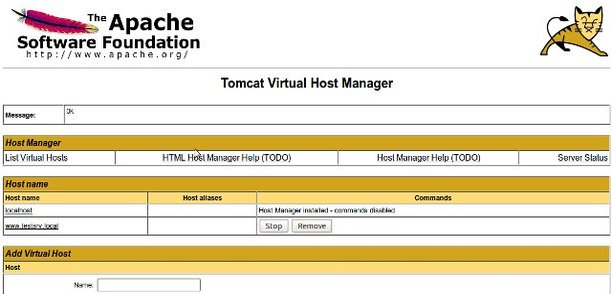
Now you can access the Tomcat manager with http://SERVER:8080/manager.
7. Install Apache2 connector
You can use the Tomcat as a standalone webserver, but the apache webserver has more features and you can use the apache modules. (mod_rewrite for example)
aptitude install apache2 libapache2-mod-jk
7.1 Apache worker
vim /etc/apache2/workers.properties
workers.tomcat_home=/opt/tomcat
workers.java_home=/usr/lib/jvm/java-6-openjdk
ps=/
worker.list=default
worker.default.port=8009
worker.default.host=localhost
worker.default.type=ajp13
worker.default.lbfactor=1
Note: Replace “/usr/lib/jvm/java-6-openjdk” with “/usr/lib/jvm/java-6-sun” if you using the non-free Sun Java runtime.
7.2 JK configuration file
vim /etc/apache2/conf.d/jk.conf
<ifmodule mod_jk.c>
    JkWorkersFile /etc/apache2/workers.properties
    JkLogFile /var/log/apache2/mod_jk.log
    JkLogLevel error
</ifmodule>
/etc/init.d/apache2 stop
/etc/init.d/tomcat restart
/etc/init.d/apache2 start
8. Create a new VirtualHost
Creating a new VirtualHost: (In Apache AND Tomcat)
8.1 Create directories
mkdir /var/www/vhost1
mkdir /var/www/vhost1/htdocs
mkdir /var/www/vhost1/logs
vim /etc/apache2/sites-available/vhost1
8.2 Apache
<virtualhost www.testsrv.local>
    JkMount /*.jsp default
    ServerName www.testsrv.local
    ServerAdmin servermaster@testsrv.local
    DocumentRoot /var/www/vhost1/htdocs
    ErrorLog /var/www/vhost1/logs/error.log
    CustomLog /var/www/vhost1/logs/access.log common
    <directory /var/www/vhost1/htdocs>
        Options -Indexes
    </directory>
</virtualhost>
Note: You can forward all files “JkMount /*” or all files in a folder “JkMount /folder/*” to the Tomcat, too.
a2ensite vhost1
/etc/init.d/apache2 reload
8.3 Tomcat
vim /opt/tomcat/conf/server.xml
<!-- www.testsrv.local -->
<Host name="www.testsrv.local" appBase="/var/www/vhost1" unpackWARs="true" autoDeploy="true">
    <Context path="" docBase="htdocs" debug="0" reloadable="true"/>
    <Valve className="org.apache.catalina.valves.AccessLogValve" directory="/var/www/vhost1/logs"  prefix="tomcat_access_" suffix=".log" pattern="common" resolveHosts="false"/>
</Host>
Note: Make sure you use a uppercase “H”, “C” and “V” for “Host”, “Content” and “Value”. This is importand since Tomcat 7.
/etc/init.d/tomcat restart
Note: You can add additional domains with:
<Alias>additionaldomain.com</Alias>
hinzufügen.
9. Create a Testpage
vim /var/www/vhost1/htdocs/test.jsp
<html>
    <head>
        <title>Hello World</title>
    </head>
    <body>
        <h1>Hello World</h1>
        Today is: <%= new java.util.Date().toString() %>
    </body>
</html>
Now you can test your configuration with http://www.testsrv.local/test.jsp
Lorenzo
7 Feb 2011thank ya very much
Markus
16 Feb 2011i did everything correctly, added “JkMount /* default” to my apache2 vhost, created the host in server.xml like
but when i try to access http://domain.tld, i allways get a http 404 by tomcat. the file index.html in /home/user/public_html already exists.
what’s wrong?
Markus
16 Feb 2011i did everything correctly, added “JkMount /* default” to my apache2 vhost, created the host in server.xml like
{Host name=”domain.tld” appBase=”/home/user” unpackWARs=”true” autoDeploy=”true”}
{Context path=”” docBase=”public_html” debug=”0″ reloadable=”true” /}
{/Host}
but when i try to access http://domain.tld, i allways get a http 404 by tomcat. the file index.html in /home/user/public_html already exists.
what’s wrong?
Cleber
22 Mai 2011No JkShmFile defined in httpd.conf
no open test.jsp
no java load
http://www.infozion.net/test.jsp
Kelvin
31 Mai 2011Thank you for the awesome tutorial. It works really really well!
This has got everything I need to implement a mixed PHP+JSP environment for my website (as of posting it’s not complete yet, though).
Thank you!
Markus
16 Feb 2011here the link to the config
http://pastebin.com/bLqtiCRa
sebastian
17 Feb 2011Hi,
please first check the tomcat logfiles. And check which file and folders on the disk tomcat wants to access.
Check all files and folder names case sensitive !!
Please add the apache and complete tomcat config to pastebin.
Greez
Sebastian
Sniper Wolf
17 Feb 2011Thank you for this fantastic post 😀
It was really useful for me!
Basti
21 Feb 2011Hallo,
klasse Tutorial. Hat auf Anhieb funktioniert :).
Zusätzlich hätte ich gerne das neben http://www.domain.de auch bei einem Aufruf von domain.de die Anfrage an den Tomcat weitergeleitet wird. Da bekomme ich momentan einen 404 des Apache.
Reicht es nicht ServerAlias und in den entsprechenden Configs anzugeben?
Noch eine Kleinigkeit: In anderen Tutorials sehen ich immer , wieso nimmst du hier einen anderen Ansatz? (mit * geht es nämlich gar nicht bei mir 🙂 )
Bei Bedarf kann ich auch meine Configs posten.
Danke schon mal für deine Hilfe.
Basti
sebastian
22 Feb 2011Hi Basti,
ich glaub da ging was verloren bei deinen Kommentar.
Ein Alias sollte reichen. Besser ist aber vielleicht du machst einen Redirect im Apache.
Gruß
Sebastian
Basti
22 Feb 2011hallo,
da scheint alles rausgeflogen zu sein was in spitzen klammern stand…
naja, mein problem hat sich erledigt mittlerweile. lag daran das plex immer dazwischen gefunkt hat.
grüße,
basti
Pingback: Installing Apache 2 and Tomcat 7 « Knowledge Networks
muchikon
27 Apr 2011Fantastic post !!! Danke Danke Danke
Thanks so much works like a charm, I will “translate” to my blog in spanish
sebastian
6 Dez 2011feel free to do it. But please add a link 🙂
Pingback: Nguni Phakela's Blog » Blog Archive » Getting Tomcat to talk to Apache 2
Jochen Szostek
8 Jun 2011Thanks! Great post!
omirp
28 Jul 2011Try this guys. That includes setup for non Tomcat subdomain.
http://kahimyang.info/kauswagan/HowtoBlogs.xhtml?b=384
sebastian
6 Dez 2011It’s simple. Just remove this line from the apache vhost:
“JkMount /*.jsp default”
and you have a non tomcat vhost.
Andreas
14 Okt 2011This is VERY helpful. However, it took me 2 days to understand that in the standard debian squeeze distribution, the /tomcat/conf/server.xml comes with the
relevant line
<!– Define an AJP 1.3 Connector on port 8009 –>
<!–Connector port=”8009″ protocol=”AJP/1.3″ redirectPort=”8443″ /–>
is commented …
Neha
3 Dez 2011I did everything as suggested above but the test.jsp does not appears. On accessing http://www.testsrv.local/test.jsp, I get this error:
🙁 503 Service Unavailable
Failed to resolve the name of server http://www.testsrv.local 🙁
Please help
sebastian
6 Dez 2011Hi,
you have to replace http://www.testsrv.local with your domain which have correct DNS-Settings for your server.
The same procedure for a classic Apache-VHost.
If you want to create a local test setup, you can insert “www.testsrv.local” in your local “/etc/hosts” file.
Just add this line:
“127.0.0.1 http://www.testsrv.local”
Greetings
Sebastian
Tomas
15 Dez 2011Very good article, thanks!
I was getting ‘/bin/bash already running’ when I was trying to start tomcat.
After digging I found https://bugs.launchpad.net/ubuntu/+source/tomcat6/+bug/632554
Solution was to add `-p “$CATALINA_PID”` to the start-stop-daemon line in catalina_sh().
Hope this will save some time for others.
/Tomas
Tomcat 7.0.23
Ubuntu 11.10
SUN Java 1.6.0_26-b03 64-bit
Florian
30 Jan 2012Hey maybe you have an idea what is wrong:
http://florian-schwab.info/helloworld.jsp
The helloworld.jsp is in /var/www/vhosts/florian-schwab.info/httpdocs
mod_jk is running correctly i think
The -Tag i created in server.xml should also be correct
sebastian
30 Jan 2012Hi,
you run Tomcat 6.0.28.
Try Tomcat 7 or use the Tomcat 6 HowTo: http://www.mogilowski.net/2008/11/24/install-tomcat-6-on-debian-lenny-with-virtual-hosts-and-apache2-integration/
There are some very small differences.
Florian
30 Jan 2012Oh thx, i forgot that i used tomcat 6
Mohammad Faisal
9 Feb 2012after step 6 when i’m trying to execute the command “/etc/init.d/tomcat start” sometime it says [fail] or sometimes [OK] but when I open the browser and type the address as: http://localhost:8080/manager
there is no content in there. Why?
sebastian
9 Feb 20121. Make sure, that tomcat is running “px aux | grep tomcat”.
2. Check Tomcat Error logs and “catalina.out”
Is there any output in the syslog if “/etc/init.d/tomcat start” fails ?
Frank
13 Mrz 2012Hey 😀
I’m runnning a vServer on EUserv.de with Debian Squeeze, Apache 2.2.16 and Tomcat 7.0.26.
I did every step you described, but I have the following issues:
– When I try to access my Server direct via IP it should show me the Apache standard message homepage “It works!…”, but I get an error 403 Forbidden.
– When I try to access the test.jsp via http://x.x.x.x/test.jsp I get a Tomcat Error Page “HTTP Status 404” (The requested resource (/test.jsp) is not available.)
– BUT, I can access Tomcat via http://x.x.x.x:8080/manager/
Any guess what I did wrong? Which log files do you need?
Best regards
Frank
ps: also when I leave
/etc/init.d/apache2 stop/etc/init.d/tomcat restart
/etc/init.d/apache2 start
in the jk.conf file, I get the following Error Message by trying to execute
/etc/init.d/apache2 reload
:
Invalid command '/etc/init.d/apache2', perhaps misspelled or defined by a module not included in the server configurationAction 'configtest' failed.
The Apache error log may have more information.
failed!
sebastian
14 Mrz 2012You don’t have to leave
/etc/init.d/apache2 stop

/etc/init.d/tomcat restart

/etc/init.d/apache2 start
in the jk.conf file !!!
This are commands you have to execute.
Frank
14 Mrz 2012I’ve noticed it yesterday (I’ve commented it out), but i doesn’t change anything 🙁
sebastian
14 Mrz 2012If Apache finds the file and sends you to tomcat check your vhost definition in /opt/tomcat/conf/tomcat-users.xml and check your catalina.out log-file, too.
Frank
14 Mrz 2012Finally, it works. I don’t know why. I just reinstalled the whole server and setup apache and tomcat again. Awesome, it works know.
Thank you very much for the tutorial 😀
Frank
14 Mrz 2012How to configure the server so that Tomcat deploy WAR-Files (for example Hudson/Jenkins) in /var/www/vhost1?
sebastian
16 Mrz 2012Hi,
the setting unpackWARs=”true” and autoDeploy=”true” should do what you want.
Collin
19 Apr 2012Great Tomcat startup script. I have modified it with ability to start Tomcat in debug mode
https://gist.github.com/2423836
ntsetso
11 Aug 2012Tks for tutorial. I works!
Just few questions:
– http://{SERVER}:8080/manager no longer works.
– http://{SERVER} opens index.html page
but
– http://{SERVER}/index.html does not work
Still need to run non tomcat content. How to?
Niklas
9 Nov 2012hey,
unfortunately it does not work in my newly-configured debian 6 server. i do not see the tomcat manager site on :8080. it just gets a timeout. i did exactly what you wrote. are there possibly more dependencies, that are not covered in your tutorial? do you guys have other ideas.
lsof tells:
java 3905 tomcat 40u IPv6 42083435 0t0 TCP *:http-alt (LISTEN)
java 3905 tomcat 53u IPv6 42140855 0t0 TCP xxx.stratoserver.net:http-alt->xxx.sc-graz.chello.at:59400 (ESTABLISHED)
Niklas
9 Nov 2012catalina.out says :
09.11.2012 18:20:49 org.apache.coyote.AbstractProtocol start
INFO: Starting ProtocolHandler [“http-bio-8080”]
09.11.2012 18:20:49 org.apache.coyote.AbstractProtocol start
INFO: Starting ProtocolHandler [“ajp-bio-8009”]
09.11.2012 18:20:49 org.apache.catalina.startup.Catalina start
INFO: Server startup in 2712 ms
sebastian
22 Apr 2014Hi,
new version available
http://www.mogilowski.net/install-apache-tomcat-8-on-debian-7-wheezy-with-virtual-hosts-and-apache2-integration
Greetings
Sebastian