New version available !! Klick here.Neue Version verfügbar !! Bitte hier klicken.
New version of my Racktables ExtensionNeue Version meiner Racktables Erweiterung.
Changes:Änderungen:
* IPv6 Support
* Support Server chassis (Bladesystems)
* Show VM Hypervisor
* Support new Racktables plugin system
* IPv6 Unterstützung
* Unterstützung von Server chassis (Bladesysteme)
* VM Hypervisor anzeige
* Unterstützt neues Racktables Plugin System
Read here the article of version 0.1.Hier findet man den Artikel über Version 0.1.
DownloadDownload
[download#16#size#nohits]New version available !! Klick here.Neue Version verfügbar !! Bitte hier klicken.
InstallationInstallation
Move folder “extensions” into the racktables “wwwroot” folder.Verschiebe den Ordner “extensions” in das “wwwroot” Verzeichnis von racktables.
With Racktables 0.19.XMit Racktables 0.19.X
Create or modify “local.php” in the “inc” folder with the following content:Ändere oder erstelle die Datei “local.php” im Verzeichnis “inc” mit folgendem Inhalt:
<?php
# Load server report
require_once "extensions/reports/server-report.php";

# Load virtual machine report
require_once "extensions/reports/vm-report.php";

# Load switch report
require_once "extensions/reports/switch-report.php";

?>
or copy the example file.oder kopiere die Beispieldatei.
With Racktables 0.20.0 or later:Mit Racktables 0.20.0 oder neuer:
Create or modify “extensions.php” in the “plugins” folder with the following content:Ändere oder erstelle die Datei “extensions.php” im Verzeichnis “plugins” mit folgendem Inhalt:
<?php

# Load server report
require_once "../wwwroot/extensions/reports/server-report.php";

# Load virtual machine report
require_once "../wwwroot/extensions/reports/vm-report.php";

# Load switch report
require_once "../wwwroot/extensions/reports/switch-report.php";

?>
or copy the example file.oder kopiere die Beispieldatei.
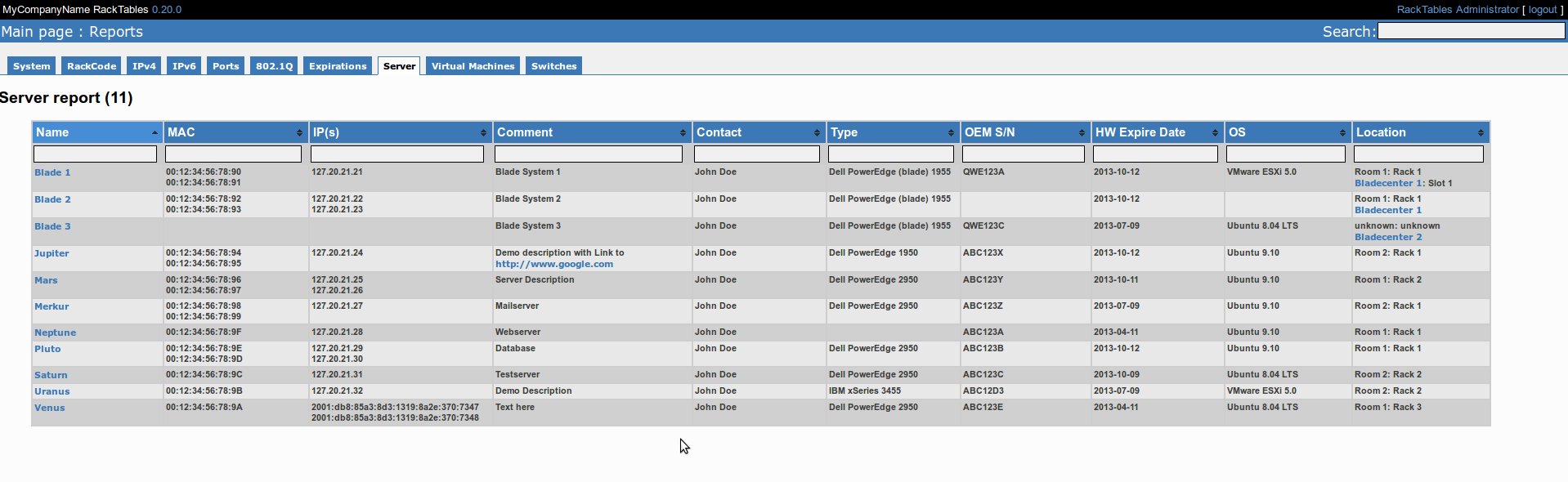
Screenshots:
UsageBenutzung
Login into racktables and go to “Reports”.Nun in die Racktables Webseite einloggen und “Reports” aufrufen.
Now you find “Server” and “Virtual machines” in the report menu.Man findet nun zwei neue Reiter “Server” und “Virtual machines” im Menü.
Note: Sort multiple columns simultaneously by holding down the shift key and clicking a second, third or even fourth column header!Bemerkung: Man kann mehrere Spalten gleichzeitig sortieren durch das gedrückthalten von Shift wärend man auf weitere Spalten in der Kopfzeile klickt!
ModifikationsModifikationen
Add custom attribute:Eigene Attribute hinzufügen:
Find the ID of your attribute. In this example it is “10002”. Open the report file “vm-report.php” for example. And add the following componets to the file:Zuerst sucht man sich die ID seines Attributes. In diesem Beispiel ist es die “10002”. Nun öffnet man zum Beispiel die Datei “vm-report.php” und fügt folgende Teile ein:
[...]
$aResult[$Result['id']]['myValue'] = '';
if ( isset( $attributes['10002']['a_value'] ) )
    $aResult[$Result['id']]['myValue'] = $attributes['10002']['a_value'];
[...]

[...]
<th>My Value</th>
[...]

[...]
<td>'.$aRow['myValue'].'</td>
[...]
An easy way to find the ID of your custom attribute is to look in the source code (with your browser) of the attribute setting in the configuration.Ein einfacher Weg, die ID seines Custom Attributes zu finden ist sich den Quelltext (mit dem Browser) der Attribute in der Konfiguration anzuschauen.
Note: If it is an standart value and not an attribute (Don’t listed in attributes in the configuration menu) you can directly access the values:Bemerkung: Falls es sich um einen Standartwert handelt und nicht um ein Attribut (Nicht in der Attributliste im Konfigurationsmenü enthalten) kann man den Wert direkt auslesen:
Example with asset Tag:Beispiel mit Asset-Tag:
[...]
$aResult[$Result['id']]['sAssetTag'] = $Result['asset_no'];
[...]

[...]
<th>Asset Tag</th>
[...]

[...]
<td>'.$aRow['sAssetTag'].'</td>
[...]
Custom sorter:Eigene Sortierung:
I have a lot of servers like vServer1, vServer2, …, vServer11, etc. but i want to list vServer10 after vServer2 so i created a custom sorter.Ich habe jede Menge Server mit Namen wie vServer1, vServer2, … vServer11, etc. und ich möchte vServer 10 nach vServer2 in meiner Liste haben. Deswegen habe ich eine eigene Sortierung gebaut.
First create a new file in the jQuery-Folder called “sorter.js” with the following content:Zuerst erstellt man eine neue Datei mit dem Namen “sorter.js” im JQuery-Verzeichnis mit folgendem Inhalt:
$.tablesorter.addParser ( {
    id: 'vserver',
    is: function(s) {
        return false;
    },
    format: function(s) {
        s = s.replace(/<a\b[^>]*>/i,'');
        s = s.replace(/[^0-9]+/g,'');
        return s.trim(s);
    },
    type: 'numeric'
});
Now open your report file “vm-report.php” for example and add:Nun öffnet man seine Report Datei wie zum Beispiel “vm-report.php” und fügt folgendes hinzu:
First the include of the new JS-Sorter:Zuerst den neuen Sorter einfügen:
"echo ' <script type="text/javascript" src="extensions/jquery/sorter.js"/>';"
And below the table in the tablesorter JS-Part:und unterhalb der Tabelle im Tablesorter JS-Teil:
[...]
headers: {
  0: { sorter: "vserver" },
  3: { sorter: "ipAddress" }
}
[...]
This sorter removes the hyperlink (added by the report) and all text parts from the name of the server (only for the sorting) and sorts the column now numeric.Dieser Customsorter entfernt den Hyperlink (durch den Report hinzugefügt) und alle Textteile vom Servernamen (nur für die Sortierung) und sortiert den Rest nummerisch.
Jim Julson
16 Jul 2012You my friend, are a rockstar! This is a great addition to RT for sure!
Question, is version 0.20 generally available? If not, how did you get it?
sebastian
16 Jul 2012Thank you !
I used the SVN Repository from Racktables
https://racktables.svn.sourceforge.net/svnroot/racktables/
Version 0.20.0 is in the Trunk
Macus Leung
30 Aug 2012I am using Racktables 0.19.3 and observe the following error. How to fix it?
PHP Warning: require_once(extensions/reports/server-report.php): failed to open stream: Permission denied in /var/www/html/racktables/inc/local.php on line 4
sebastian
30 Aug 2012I hope you mean 0.19.13
Check the permissions of the file “server-report.php” and allow access to it for your webserver user.
Greetings
Sebastian
Macus Leung
30 Aug 2012It was caused by the selinux.
Finally I work around this issue by execute setsebool -P httpd_read_user_content=1 as root
I am using Centos 6.3.
If I don’t want to change the selinux policy and set httpd_read_user_content=1, what others I can do to fix it?
Macus Leung
30 Aug 2012I found the fix finally.
Change to the racktables dir and execute to reset the SELinux security contexts
restorecon -Rv extensions/
TommyBotten
4 Sep 2012An excellent plugin, indeed. Thank you very much for your contribution. I have been looking to do the same, when I stumbled over your extension.
Have you considered to push it upstream to either racktables core or perhaps the contrib?
https://github.com/RackTables/racktables-contribs
Thanks again!
sebastian
4 Sep 2012Hi,
thank you !
I’m currently working on version 0.3 of the extension with some new features.
I hope to release it with racktabes 0.20.0 so i can remove a lot of stuff from the sourcode i need to be compatible with some older versions of racktables.
Add it to contrib is a good idea, the racktables developers should decide if they want to add it to the core.
Greets
Sebastian
TommyBotten
4 Sep 2012Great!
Looking forward to 0.3! 🙂
Chuck
18 Sep 2012Does anyone have this running under version 0.20.0? I have it running fine under 0.19.13 but when trying the new plugin location setup on 0.20.0 it never loads. Any ideas? Thanks for your work on this!!
sebastian
18 Sep 2012Hi,
it works on racktables 0.20.0 ( i developed it on 0.20.0 )
Did you follow the instructions for version 0.20.0 ? Only the extension.php should be in the plugin directory. The plugin requests some files (JQuery and CSS) from the webroot. The rest of the plugin must stay on its old position.
Greetings
Sebastian
Billy
27 Sep 2012I have the same problem as Chuck. I have followed the instructions exactly but won’t load. Any suggestions?
sebastian
27 Sep 2012Hi,
extension folder is in the webroot of racktables and extension.php in the plugin directory ?
Old local.php removed (replaced by extension.php in v 0.20.0)
Greetings
Sebastian
Chuck
10 Okt 2012I think there is a problem reading the path.
My directory structure is c:\www\racktables\extensions\
The server is publishing as http://servername/racktables
How does the extension.php plugin path need to be set?
require_once “../racktables/extensions/reports/server-report.php”;
Does not appear to be read at all.
leonel
28 Apr 2014Hi
When i tried to install over 0.20.3, i can’t see the new reports, is there anothe configuration for this version of RT?
sebastian
30 Apr 2014Hi,
it run on all versions 0.20.x
Greetings
Sebastian
garagasli
24 Jan 2015Documentroot: /var/www/html/racktables
I installed racktables 0.20.9. I downloaded racktables_extensions_v0.3.1-5.tar and then tar xvc racktab****.tar -C /var/www/html/racktables/ ; cd /var/www/html/racktables
mv racktables_extension* plugins; cd plugins; mv extensions ../. ;
But not working.
sebastian
9 Feb 2015Hi,
please ask your server administrator i think it is an permission problem.
The white pages are probably PHP Errors. ( There is no output defined for PHP Errors, thats default configuration of PHP. )
The Error you posted:
PHP Fatal error: require_once(): Failed opening required ‘/var/www/html/plugins/extension.php’
This may be because your webserver is not allowed to open the plugin file.
But i’m not sure. This are not directly problems with this plugin or racktables. Please ask your system administrator to check the webserver configuration and the permissions and flags of your files.
Greetings
Sebastian
K_storage
9 Feb 2015Thanks, i’ll take it from here
K_storage
9 Feb 2015Hi,
im using racktable 0.20.9 on CentOS
root folder is /var/www/html/racktable
i copied the “extensions” folder in to:
/var/www/html/racktables
there is no folder named “plugin” so i created one and add the file
/var/www/html/racktables/extension.php
now.. there is no wwwroot folder (not using windows iis)
so i canged the path to “require_once “/extensions/reports/server-report.php”;”
still nothing working..
any ideas?
sebastian
9 Feb 2015wwwroot and plugins directory are IN the racktables folder.
Your directory structure must be correct so racktables can include plugins.
K_storage
9 Feb 2015Thanks for answering.
There are no such file in my installation.
Can you assist by explaining what folders to add?
my root folder is:
/var/www/html/racktables
in it i have:
css inc index.php js pix
Do i need to reinstall the application or can it be fixed?
Thanks.
sebastian
9 Feb 2015Hi,
you installed racktables wrong.
css, inc, index.php js and pix are the content of the wwwroot directory if this is your /var/www/html/racktables directory, than put your plugins directory under /var/www/html/plugins.
sebastian
9 Feb 2015Sorry, according to the racktables installation guide you installed it correct.
https://wiki.racktables.org/index.php/RackTablesInstallHowto
Thats a little bit confusing.
But nevermind. Create /var/www/html/plugins and use it as your plugin directory. And put the extension directory inside your racktables folder.
K_storage
9 Feb 2015I tried that but whenever i put the “extension.php” in /var/www/html/plugins
i am getting blank (white) pages
i tried to change the content of the extension.php to use:
require_once “/var/www/html/racktables/extensions/reports/server-report.php”;
but still not working all im getting is blank pages.
ideas?
thanks in advanced
sebastian
9 Feb 2015White pages may be php errors. Turn on your debug output. Or check apache error log.
Pathes (plugin and folders) seems to be correct now.
K_storage
9 Feb 2015Thanks for the comment, i found this in the error log of the apache:
PHP Fatal error: require_once(): Failed opening required ‘/var/www/html/plugins/extension.php’ (include_path=’.:/usr/share/pear:/usr/share/php’) in /var/www/html/racktables/inc/init.php on line 146, referer: http://my-site/racktables/index.php?page=report
and in the /var/www/html/racktables/inc/init.php
/ load additional plugins
ob_start();
if (FALSE !== $plugin_files = glob (“${racktables_plugins_dir}/*.php”))
foreach ($plugin_files as $plugin_file)
require_once $plugin_file;
// display plugins output if it contains something but newlines
$tmp = ob_get_clean();
if ($tmp != ” and ! preg_match (“/^\n+$/D”, $tmp))
echo $tmp;
unset ($tmp);
sebastian
9 Feb 2015Hi,
please check if /var/www/html/plugins/extension.php exists and is readable for your apache user.
Greetings
Sebastian
K_storage
9 Feb 2015That the problem, whenever i put the extension.php in the plugin dir
the site stop working (show blanks pages) until i delete the file
sebastian
9 Feb 2015Hi,
please check your server config “Failed opening” i guess you have file/dir permission problems.
Greets
Sebastian
K_storage
9 Feb 2015excuse my ignorance but what is “Failed openin” or more important where can i configure it?
Thanks
K_storage
9 Feb 2015I tried that but whenever i put the “extension.php” in /var/www/html/plugins
i am getting blank (white) pages
i tried to change the content of the extension.php to use:
require_once “/var/www/html/racktables/extensions/reports/server-report.php”;
but still not working all im getting is blank pages.
ideas?
thanks in advanced
Andrew Hsieh
13 Feb 2015Dear Sebastian,
Thanks a lot!
It works for me in 0.20.0. I can now see these three new pages in Report tab.
You save me a lot of time by using this.
Best regards,
Andrew Hsieh
2015/02/13
RJ
21 Jan 2016This worked great!
I managed to add other attributes in the report, but I am having some trouble including the Location Name in it. Can anyone help me with this please?
Also, is there a way we can do bulk upload of data?
Best regards,
RJ