Da ich leider keine Coldfusion Templates für Cacti gefunden habe, habe ich hier mal kurz selber eines erstellt. Für die Abfrage wird cfstat benutzt. Cacti und Coldfusion laufen in dieser Konfiguration unter Linux.I don’t found a coldfusion template for Cacti so i created one. It uses cfstat. I use Cacti and coldfusion on Debian Linux.
Zuerst wird ein Skript benötigt welches den cfstat Befehl auf den Servern ausführt:First you need a script to call the cfstat command on the coldfusion server:
#!/bin/bash

# This script call the coldfusion server stat service and format the output for cacti
# 2008 by Mogilowski Sebastian

# Settings:
HOSTNAME='127.0.0.1'
SSH_USER='username'
SSH_KEY_FILE='/path/to/ssh/key/file'
# Check argument
if [ $# -ne 1 ]
then
  echo "Usage: `basename $0` <hostname>"
  exit $E_BADARGS
fi

# Using command line argument 1 for hostname
HOSTNAME=$1

# Request statistics from the coldfusion stat service
STAT_OUTPUT=`ssh -i $SSH_KEY_FILE $SSH_USER@$HOSTNAME /opt/coldfusion8/bin/cfstat -n -x`

# Format the output for cacti
IFS=" "
ARRAY_OUTPUT=($STAT_OUTPUT)
echo "Pg/Sec_Now:"${ARRAY_OUTPUT[0]}" Pg/Sec_Hi:"${ARRAY_OUTPUT[1]}"
      DB/Sec_Now:"${ARRAY_OUTPUT[2]}" DB/Sec_Hi:"${ARRAY_OUTPUT[3]}"
      CP/Sec_Now:"${ARRAY_OUTPUT[4]}" CP/Sec_Hi:"${ARRAY_OUTPUT[4]}"
      Reqs_Qed:"${ARRAY_OUTPUT[6]}" Reqs_Rung:"${ARRAY_OUTPUT[7]}"
      Reqs_TOed:"${ARRAY_OUTPUT[8]}" Templ_Qed:"${ARRAY_OUTPUT[9]}"
      Templ_Rung:"${ARRAY_OUTPUT[10]}" Templ_TOed:"${ARRAY_OUTPUT[11]}"
      Flash_Qed:"${ARRAY_OUTPUT[12]}" Flash_Rung:"${ARRAY_OUTPUT[13]}"
      Flash_TOed:"${ARRAY_OUTPUT[14]}" CFC_Qed:"${ARRAY_OUTPUT[15]}"
      CFC_Rung:"${ARRAY_OUTPUT[16]}" CFC_TOed:"${ARRAY_OUTPUT[17]}"
      WebS_Qed:"${ARRAY_OUTPUT[18]}" WebS_Rung:"${ARRAY_OUTPUT[19]}"
      WebS_TOed:"${ARRAY_OUTPUT[20]}" AvgQ_time:"${ARRAY_OUTPUT[21]}"
      AvgReq_Time:"${ARRAY_OUTPUT[22]}" AvgDB_Time:"${ARRAY_OUTPUT[23]}"
      Bytes_In/Sec:"${ARRAY_OUTPUT[24]}" Bytes_Out/Sec:"${ARRAY_OUTPUT[25]}
Dieses Skript führt per ssh die cfstat Anfrage auf dem Coldfusion Server aus, und formatiert die erhaltenen Daten so um, das diese mit Cacti auszuwerten sind. Mit dem Parameter -n wird die Ausgabe der Kopfzeile (Feldnamen) unterdrückt und mit -x holt man sich alle Werte. Für die Einrichtung der Schlüsselbasierten ssh Authtifizierung verweise ich auf Google oder http://oreilly.com/pub/h/66. Zum ausführen von cfstat sind keine root-Rechte erforderlich, somit ist kein sudo erforderlich. Hier das Skript als Download:This script calls cfstat via ssh on the coldfusion server, and format the data for cacti. With the parameter -n you disable the header output and option -x enables all values. For manual for remote command execution with ssh use google or http://oreilly.com/pub/h/66. You don’t need root permissons for cfstat. You can download the script here:
[download#6#size#nohits]Es muss im script Verzeichnis von Cacti abgelegt werden. Save it in the script directory of cacti.(Debian: /usr/share/cacti/site/scripts/getColdFusionStats.sh)
Als nächstes müssen entsprechende Cacti Templates angelegt werden. Hier sollte man sich die Cacti Dokumentation ansehen. Hier habe hier auch mein Template zum download bereitgestellt:Now you have to create the cacti templates. Look at the documentation of cacti for more informations. Here is my template:
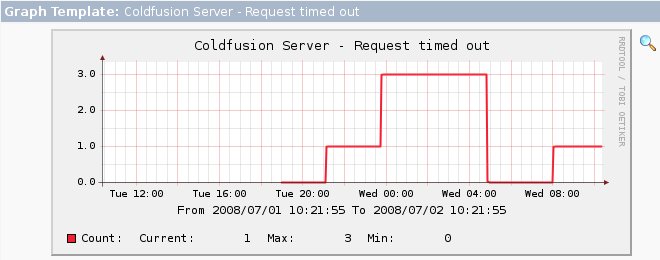
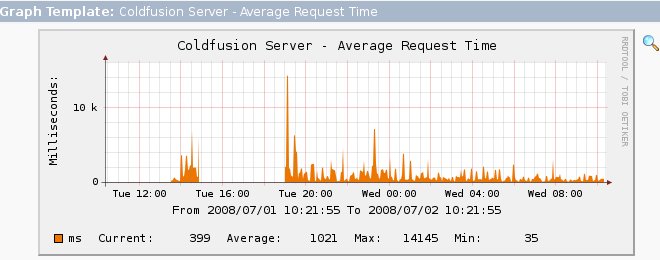
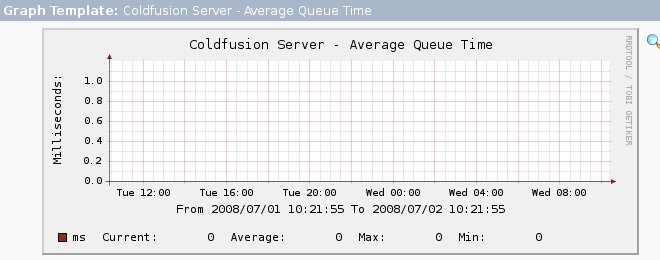
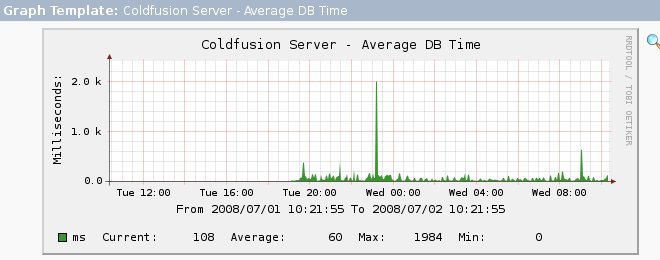
[download#5#size#nohits]Zur Zeit werden 4 Werte abgefragt (AvgQ Time, AvgReq Time, AvgDB Time, Req TO’ed).This values will be graphed: AvgQ Time, AvgReq Time, AvgDB Time, Req TO’ed
Hier einige Screenshots von den erstellten Graphen:Some screenshots:
Ich bitte um Feedback, wenn entsprechendes Interesse besteht, kann man einen Thread im Cacti Forum erstellen.Please give me feedback for this template.
Bemerkung: Funktioniert nur mit der Singleserver Installation, da in der Multiserver cfstat nicht verfügbar ist.Note: Only available for singe server instance of coldfusion, because cfstat is not available in the multiserver configuration.
mark neale
16 März 2011Thanks for this. After some experimentation I have got this to work I think. One comment, you cannot use the ‚/‘ character in Cacti output variables in your script so things like Bytes_In/Sec must instead read Bytes_In_Sec
I have also had to resort to using telnet and expect to get the data off my W2008 server onto my Linux Cacti host.