Two custom reports for Racktables to list physical servers and virtual machines.Zwei Custom Reports für Racktables um physikalische und virtuelle Server aufzulisten.
Just download it here:Download hier: [download#15#size#nohits]
New version available !! Klick here.Neue Version verfügbar !! Bitte hier klicken.
Move folder „extensions“ into the racktables „wwwroot“ folder and create or modify „local.php“ in the „inc“ folder with the following content:Verschiebe den Ordner „extensions“ in das „wwwroot“ Verzeichnis von racktables und ändere oder erstelle die Datei „local.php“ im Verzeichnis „inc“ mit folgendem Inhalt:
# Load server report
require_once "extensions/reports/server-report.php";

# Load virtual machine report
require_once "extensions/reports/vm-report.php";
Login into racktables and go to „Reports“.Nun in die Racktables Webseite einloggen und „Reports“ aufrufen.
Now you find „Server“ and „Virtual machines“ in the report menu.Man findet nun zwei neue Reiter „Server“ und „Virtual machines“ im Menü.
Screenshots:
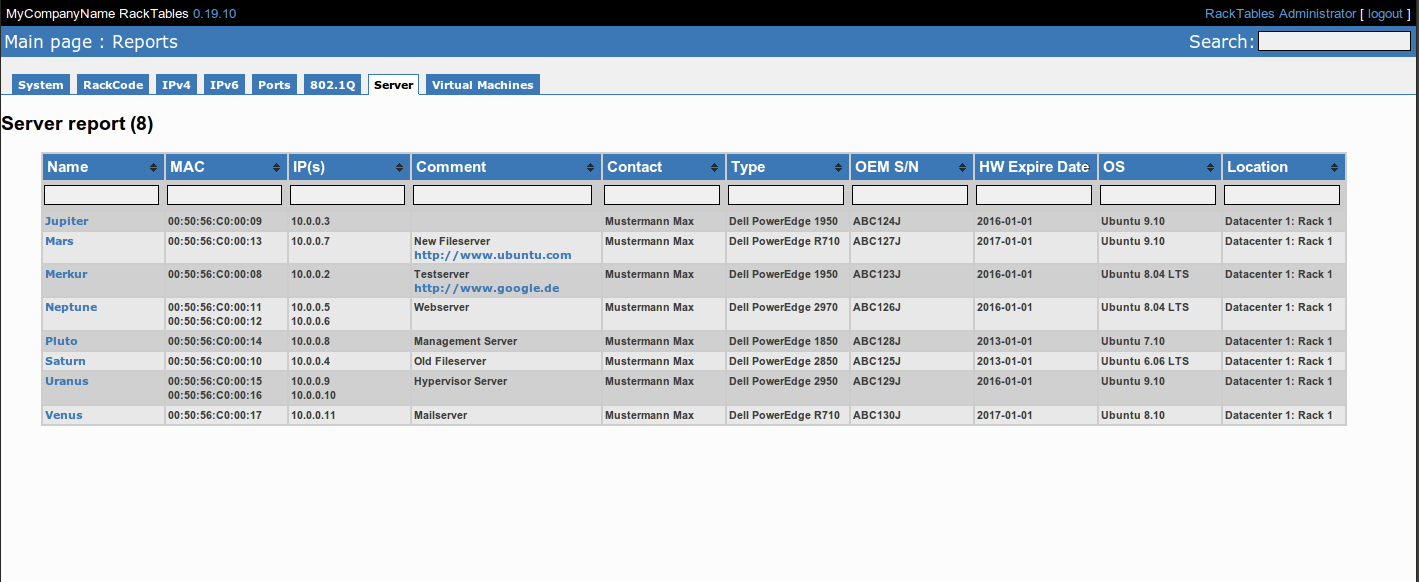
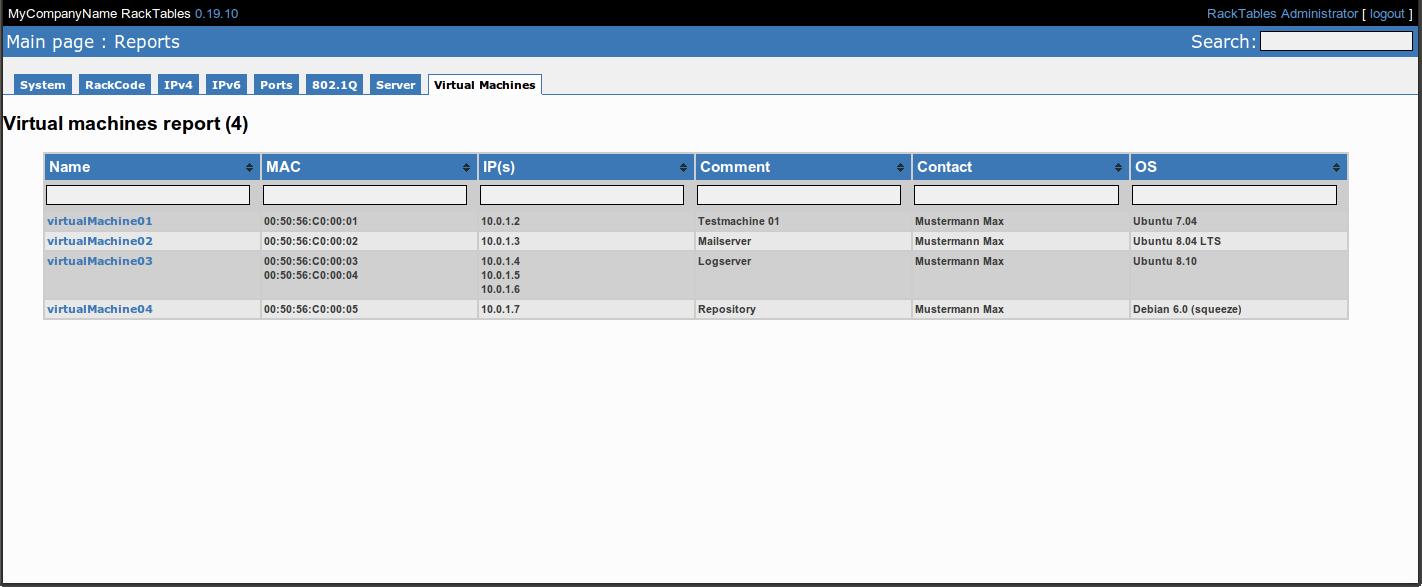
Note: Sort multiple columns simultaneously by holding down the shift key and clicking a second, third or even fourth column header!Bemerkung: Man kann mehrere Spalten gleichzeitig sortieren durch das gedrückthalten von Shift wärend man auf weitere Spalten in der Kopfzeile klickt!
Hi,
I tried your code but I am getting „require_once ‚/var/www/racktables/extensions/reports/server-report.php‘; require_once ‚/var/www/racktables/extensions/reports/vm-report.php‘ “ on all the pages of racktables
local.php file
require_once ‚extensions/reports/server-report.php‘;
require_once ‚extensions/reports/vm-report.php‘;
PHP Version: PHP 5.3.6-13ubuntu3.6 with Suhosin-Patch (cli) (built: Feb 11 2012 02:17:16)
Regards
Ankush
Hi,
check your file permissions. Suhosin-Patch needs correct file permissions. (Use the same as the rest of racktables uses.)
And check if the path „/var/www/racktables/extensions/reports/“ is correct.
Greets
Sebastian
It is now working fine. There was some typo mistake.
Regards
Ankush
Nice work
Very nice work, thanks much!
Dear sir ,
it’s nice work ,but after i follow the above steps i can see the (server & virtual machine )tabs ,but i have a problem that i cannot see any thing in MAC address tab and HW expire date ,so please advice
Hello,
can you tell me the version number of your racktables installation ?
Greetings
Sebastian
Hi,
Does this works with 0.20 version of racktables?
Regards
Ankush
Use the new version:
http://www.mogilowski.net/2012/07/16/racktables-extension-v0-2
Greetings
Sebastian
Good post. I absolutely love this website.
Continue the good work!