vmware
Monitoring VMWare vSphere with Grafana and Telegraf
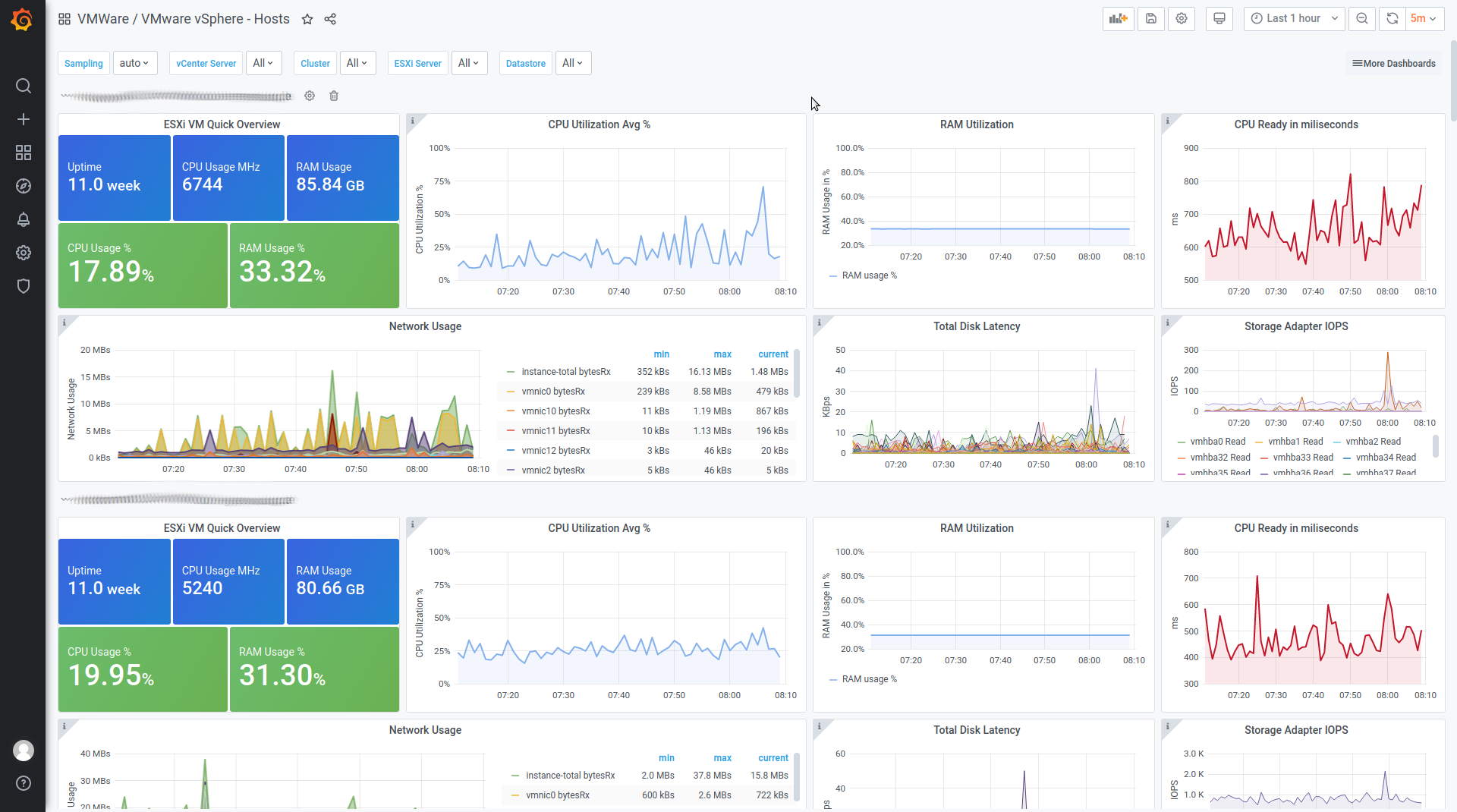
Collector Configuration You need the latest Telegraf version which includes the vSphere Plugin! On Ubuntu or Debian you can get it with: Now add the following lines to your ‚/etc/telegraf/telegraf.conf‘: ### VMWARE #### ## Realtime instance [[inputs.vsphere]] interval = „60s“ vcenters = [ „https://VCENTERSERVER/sdk“ ] username = „USERNAME@vsphere.local“ password = „PASSWORD“ insecure_skip_verify = true force_discover_on_init […]
Install VMware Tools on Debian Squeeze
1. Install required packages aptitude install autoconf automake binutils cpp gcc linux-headers-$(uname -r) make psmisc 2. Mount VMware Tools mkdir /tmp/vmtools mount /dev/cdrom /tmp/vmtools 3. Unzip the tools tar -C /tmp -vfx /tmp/vmtools/VMwareTools*.tar.gz 4. Run install script cd /tmp/vmware-tools-distrib ./vmware-install.pl Note: You can also use the „open-vm-tools“ instead of installing the VMware Tools. aptitude install […]
VMWare Open Virtualization Format Tool
Command line utility that supports import and export of OVF packages. Download Download VMWare Open Virtualization Format Tool here: http://communities.vmware.com/community/vmtn/vsphere/automationtools/ovf You can download this tool for Windows (64-Bit or 32-Bit), Linux (64-Bit or 32-Bit) and Mac OSX. Install chmod +x VMware-ovftool-2.0.1-260188-lin.x86_64.sh ./VMware-ovftool-2.0.1-260188-lin.x86_64.sh Convert OVF to VMX /opt/vmware/ovftool/ovftool /path/to/vm.ovf /path/to/vm.vmx Convert VMX to OVF /opt/vmware/ovftool/ovftool /path/to/vm.vmx […]
How to Use VNC to access VMware Servers
Die „.vmx“ Datei der virtuellen Maschine bearbeiten und folgende Zeilen anfügen:Edit the „.vmx“ file of your virtual machine and add this lines: RemoteDisplay.vnc.enabled = „TRUE“ RemoteDisplay.vnc.port = „5900“ RemoteDisplay.vnc.password = „YOUR_PASSWORD“ Bemerkung: Für jede virtuelle Maschine einen anderen Port verwenden.Note: Use a different port for each virtual machine. Links: * http://kb.vmware.com/selfservice/microsites/search.do?cmd=displayKC&externalId=1246
VMware Server 2, Proxysvc SSL Handshake problems
Get this server in /var/log/vmware/hostd.log if you want to connect to your VMWare Server ? Proxysvc SSL Handshake on client connection failed: SSL Exception Open about:config in Firefox and change security.enable.ssl2 from false into true In some cases you have to kill the vmware-hostd process and restart the management deamon: /etc/init.d/vmware-mgmt restart Links * http://planetvm.net/blog/?p=1087 […]
VMWare Server 2 – Unable to build the vsock module
Just a quick Post, the solution for the „Unable to build the vsock module“ error message if you install VMWare Server 2 on Debian or Ubuntu: tar xvf /usr/lib/vmware/modules/source/vsock.tar cd vsock-only sed -i ’s/^\#include //‘ autoconf/*.c make cp vsock.o /lib/modules/$(uname -r)/misc ln -s vsock.o /lib/modules/$(uname -r)/misc/vsock.ko depmod -a invoke-rc.d vmware restart
VMWare Workstation / Player Installer 6.5.3 Hangs
The installer of VMWare Workstation (and Player) hangs on Ubuntu Karmic 9.10. „Cause: the installer runs vmware-modconfig-console which produces enough output with some kernels that the python engine deadlocks is command piplining during the compile.“ You need 2 consoles. In the first one type: sudo -i while true; do killall -9 vmware-modconfig-console; sleep 1; done […]
VMWare Server 2 – RuntimeFault: Database temporarily unavailable or has network problems
If you add a new User (New Permission) to the VMWare Server 2 via the VMware Infrastructure Web Access you may get the message „The server response included one or more errors“ with the details „RuntimeFault: Database temporarily unavailable or has network problems“. To fix this you first have to stop the VMWare management service: […]
VMWare Infrastructure Client with VMWare Server
I had a lot of problems with the new webinterface of VMWare Server 2. The interface is very unstable and not very comfortable for the VMWare configuration. I need an alternative for the browser application. The new VMWare Server 2 is very simular to the ESXi or ESX Server from VMWare so you can use […]
VMWare Server 1.0.5 – Ubuntu Hardy Heron 8.04
Der VMWare Server lässt sich unter Ubuntu 8.04 nicht mehr über den Paketmanager installieren. Man muss ihn deshalb manuell installieren. Dazu läd man sich zuerst den VMWare Server von der VMWare Webseite herrunter. Außerdem wird das [download#4#size#nohits] in der Version 1.1.6 benötigt, welches man in das entpackte VMWare Server Verzeichnis kopiert. Bevor man mit der […]