Install Foswiki on Ubuntu with Nginx
The serverDer Server
I start with a default installation of Ubuntu server (11.10 in this Howto).
Install Nginx
Install software to add PPA:
aptitude install python-software-properties
Add Nginx PPA:
nginx=stable # use nginx=development for latest development version
add-apt-repository ppa:nginx/$nginx
Install Ngnix:
aptitude update
aptitude install nginx
See Nginx install Ubuntu PPA for more details.
FastCGI
Now install FastCGI for Nginx:
aptitude install fcgiwrap spawn-fcgi
See Linode perl-fastcgi on Ubuntu
Install Foswiki
wget http://sourceforge.net/projects/foswiki/files/foswiki/1.1.4/Foswiki-1.1.4.tgz
mkdir /var/www
tar vfx Foswiki-1.1.4.tgz
mv Foswiki-1.1.4 /var/www/foswiki
chown www-data:www-data /var/www -R
Install required packets for Foswiki
aptitude install rcs libarchive-tar-perl libarchive-zip-perl libcgi-session-perl \
libdigest-sha-perl libdigest-sha1-perl libhtml-entities-numbered-perl \
libhtml-parser-perl libhtml-tree-perl
Configure Ngnix
Remove the ‚default‘ site configuration by deleting the symlink:
rm /etc/nginx/sites-enabled/default
Create ‚/etc/nginx/sites-available/foswiki.conf‘ with this content:
server {
    listen       80;
    server_name  foswikiserver;

    set $foswiki_root "/var/www/foswiki";
    root $foswiki_root;

    location / {
        root $foswiki_root;
        index index.html;
    }

    location /bin/configure {
        allow 127.0.0.1;
        allow YOUR_IP_HERE_!!!;
        deny all;
        gzip off;
        fastcgi_pass unix:/var/run/fcgiwrap.socket;
        fastcgi_split_path_info ^/foswiki(/bin/configure)(?:\.pl)?(.*);
        fastcgi_param  SCRIPT_FILENAME  $foswiki_root$fastcgi_script_name;
        fastcgi_param  PATH_INFO $fastcgi_path_info;
        include fastcgi_params;
    }
}
Note: Replace „YOUR_IP_HERE_!!!“ with the IP-Address of your workstation to allow you the access to the configuration page.
Now enable the new site:
ln -s /etc/nginx/sites-available/foswiki.conf /etc/nginx/sites-enabled/
Restart Ngnix:
service nginx restart
Note: My Foswiki server called ‚foswikiserver‘ you have to replace this with your Domainname like ‚www.myfoswiki.com‘.
Configure Foswiki
Now open ‚http://foswikiserver‘ in your browser:
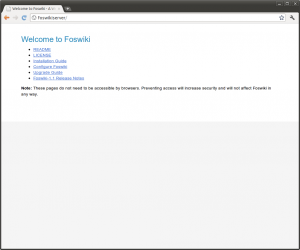
Select ‚Configure Foswiki‘ and make your configuration settings.
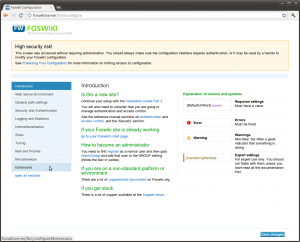
Now go to ‚Extensions‘ and select ‚Install and Update Extensions‘.
Search the ‚FastCGIEngineContrib‘ Extension and install it.
More informations see: Foswiki configuration on Nginx
Configure Foswiki FastCGI
Install the requires package:
aptitude install libfcgi-perl
Now create a small upstart script to run foswiki FastCGI.
Create ‚/etc/init/foswiki.conf‘:
# Foswiki - Service Upstart script #

description "foswiki"
author "Mogilowski Sebastian"

start on started networking
stop on runlevel [!2345]

env FOSHOMEDIR=/var/www/foswiki
env FOSSOCKDIR=/var/run/nginx
env FOSUSER=www-data
env FOSGROUP=www-data
env NUMCHILDS=25

respawn

pre-start script
    chdir $FOSHOMEDIR/bin
    mkdir $FOSSOCKDIR                              ||true
    chown $FOSUSER:$FOSGROUP $FOSSOCKDIR           ||true
    chmod 0755 $FOSSOCKDIR                         ||true
end script

script
  cd $FOSHOMEDIR/bin

  exec su -s /bin/sh -c 'exec "$0" "$@"' -- $FOSUSER ./foswiki.fcgi -n $NUMCHILDS -l $FOSSOCKDIR/foswiki.sock

end script
Now you can start the foswiki service:
service foswiki start
Now extend the Ngnix configuration ‚/etc/nginx/sites-available/foswiki.conf‘:
server {
    listen       80;
    server_name  foswikiserver;

    set $foswiki_root "/var/www/foswiki";
    root $foswiki_root;

    location / {
        root $foswiki_root;
	rewrite ^/?$ http://foswikiserver/bin/view.pl/Main permanent;
    }

    location /bin/configure {
        allow 127.0.0.1; # localhost, you may want to omit due to security considerations.
        allow YOUR_IP_HERE_!!!;
        deny all;
        gzip off;
        fastcgi_pass unix:/var/run/fcgiwrap.socket;
        fastcgi_split_path_info ^/foswiki(/bin/configure)(?:\.pl)?(.*);
        fastcgi_param  SCRIPT_FILENAME  $foswiki_root$fastcgi_script_name;
        fastcgi_param  PATH_INFO $fastcgi_path_info;
        include fastcgi_params;
    }

    location /bin/ {
           gzip off;
           fastcgi_pass             unix:/var/run/nginx/foswiki.sock;
           fastcgi_split_path_info  ^(/bin/\w+)(.*);
           fastcgi_param            SCRIPT_FILENAME $foswiki_root/$fastcgi_script_name;
           fastcgi_param            PATH_INFO       $fastcgi_path_info;
           fastcgi_param            SCRIPT_NAME     $fastcgi_script_name;
           include fastcgi_params;
       }

    location ~ (^/lib|^/data|^/locale|^/templates|^/tools|^/work) {
        deny all;
    }

    if ($http_user_agent ~ ^SiteSucker|^iGetter|^larbin|^LeechGet|^RealDownload|^Teleport|^Webwhacker|^WebDevil|^Webzip|^Attache|^SiteSnagger|^WX_mail|^EmailCollector|^WhoWhere|^Roverbot|^ActiveAgent|^EmailSiphon|^CrownPeak-HttpAgent|^$) {
        rewrite .* /404.html break;
   }
}
Note: Remember to replace „YOUR_IP_HERE_!!!“ with the IP-Address of your workstation to allow you the access to the configuration page and to replace ‚foswikiserver‘ with your servername.Last step is to reload Nginx webserver:Der letzte Schritt ist den Nginx-Webserver neu zu starten:
service nginx reload
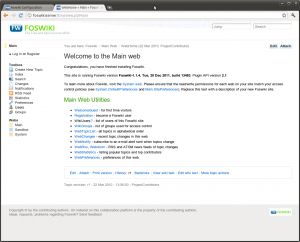
Open foswiki in your browser with ‚http://foswikiserver‘.
Links:
* foswiki.org
* nginx.org
* Foswiki configuration on Nginx
* Perl FastCGI on Ubuntu
* Install Ubuntu_PPA
* Foswiki FastCGIEngineContrib Extension
* Running upstart jobs as unprivileged users
* Upstart Intro, Cookbook and Best Practises
Xen FileSystem Performance Test Install Ubuntu on DELL Latitude ST Tablet
This doesn’t work
Hi,
ok some more informations would be very helpfull.
There are invalid spaces inbetween the code. Could you put the code on some gitrepo.