Update: Add Ubuntu 12.04 supportAktualisierung: Ubuntu 12.04 Unterstützung hinzugefügt.
Installing Novell Groupwise 8 on Ubuntu 11.10 Oneiric Ocelot or 12.04 Precise Pangolin 64-Bit.Installation von Novell Groupwise 8 unter Ubuntu 11.10 Oneiric Ocelot oder 12.04 Precise Pangolin 64-Bit.
DownloadsDateien herrunterladen
Download the Groupwise 8 Linux Client Tarball from Novell:Groupwise 8 Linux Client Tarball von Novell herrunterladen: http://gwclient.provo.novell.com | alternative
Download Java JRE (jre-7u3-linux-i586.tar.gz) from Oracle:Java JRE (jre-7u3-linux-i586.tar.gz) von Oracle herrunterladen: http://www.oracle.com/technetwork/java/javase/downloads/index.html
Install Alien and required packetsAlien und benötigte Pakete installieren
aptitude install alien ia32-libs libstdc++5 libgnome2-0
Extract JREJRE entpacken
cd Downloads
tar vfx jre-7u3-linux-i586.tar.gz
Extract GroupwiseGroupwise entpacken
tar vfx gw802_hp3_client_linux_multi.tar.gz
cd gw8.0.2-96933_client_linux_multi/
Extract the RPM-PacketRPM-Paket entpacken
alien --generate --scripts novell-groupwise-client-8.0.2-96933.i586.rpm
Change architectureArchitektur ändern
cd novell-groupwise-client-8.0.2
vi debian/control
ReplaceErsetze
Architecture: i386
withdurch
Architecture: amd64
Replace JAVAJAVA ersetzen
rm opt/novell/groupwise/client/java -R
mv ../../jre1.7.0_03 opt/novell/groupwise/client/java
Create PacketPaket erzeugen
Just type:Einfach folgendes in dein Terminal eingeben:
debian/rules binary
in your terminal to create the new DEP-Packet.um ein neues Debian Packet zu erzeugen.
Note: You can ignore the warnings during this process.Bemerkung: Man kann die Warnungen beim erstellen des Paketes ignorieren.
InstallInstallation
dpkg -i ../novell-groupwise-client_8.0.2-96934_amd64.deb
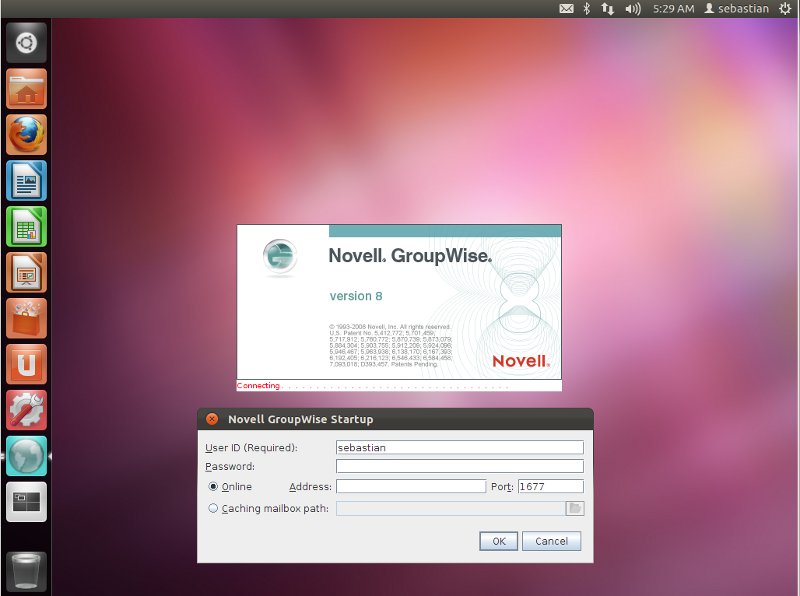
Thanks. I tested this on Ubuntu 12.04 and you have to install following package to make it work: libxtst6:i386, either in terminal or the software center.
Works perfect afterwards
Thanks 🙂
Very useful for my own upgrade to 12.04
Update:
I don’t have to install libxtst6:i386, because it was already installed on my Ubuntu 12.04 system.
(Tested on a fresh installation of Ubuntu 12.04)
Hi Sebastien,
thanks again for this tutorial. As previously mentioned I installed groupwise with your description on 12.04. There is one problem: When I click on a link in an e-mail, I get this error:
Cannot run program ‚gnome-open‘: error=2, Datei oder Verzeichnis nicht gefunden
Do you have any idea how to solve that problem?
Hi David,
you don’t have „gnome-open“ installed. It is in the package „libgnome2-0“ install it with:
now it should work.
Greetings
Sebastian
Yes it works now. Thank you.
When I use Alien to convert the RPM files, it throws a lot of DB5 errors. The resulting DEB files go through the motions of installations, but nothing actually installs. Do I have to uninstall the old GroupWise to install this new one?
Hi,
i installed it on a plain system. There was no Groupwise installed before.
It does work fine on Mint 13 Cinnamon x64
The install of the .deb throws few errors like:
Error: Could not open input file: /opt/novell/groupwise/client/java/lib/rt.pack
but the actual .jar files are there (so it looks cosmetic only)
I just installed it on Mint 13 CInnamon x64 as well with no problems, beside the same errors when installing the .deb
Everything works well with the client, except that the calendar is stuck loading and never actually loads…
Am I missing something?
No … you do not miss anything. The refresh key F5 does not work, too.
Is there anybody who is able to help????
Here is a working solution for me for Mint Linux 13 Cinnamon x64. I use BOTH .rpm and I DON’T replace Java. Calendar and F5 then both work.
1. Install Alien and required packages
sudo aptitude install alien ia32-libs libstdc++5 libgnome2-0
2. Extract GroupWise
tar -zxvf gw802_hp3_client_linux_en.tar.gz
cd gw8.0.2-96933_client_linux_en/
3. Extract both .rpm
sudo alien –generate –scripts novell-groupwise-gwcheck-8.0.2-96933.i586.rpm
sudo alien –generate –scripts novell-groupwise-client-8.0.2-96933.i586.rpm
4. Change architecture and create both .deb
cd novell-groupwise-gwcheck-8.0.2
sudo gedit debian/control
replace i386 with amd64
save and close
sudo debian/rules binary
– same procedure for the client rpm –
5. Install
sudo dpkg -i novell-groupwise-gwcheck_8.0.2-96934_amd64.deb
sudo dpkg -i novell-groupwise-client_8.0.2-96934_amd64.deb
Done!
On Kubuntu 12.04 the *.deb file is not created by command:
debian/rules binary
and after copy of debian directory to the /opt Grpupwise works but without:
– calendar support
– F5 Refresh key does not work
– … etc.
is there anything what should be done at Kubuntu (KDE flavor of Ubuntu)?
same problems on Ubuntu 12.04!!!
same problems on Ubuntu 12.04, too!!!
Tried to install on i386 machine with ubuntu 12.04, following exactly all recommendattions (except the amd64 replacement)
it launchs, asks for a password, a small icon appears, and then nothing,
a window is opened, but remains desperately white
is the installation different on a i386 machine ?
This is because you used java 1.7 – the client needs 1.6 to work properly.
Replace the java/ dir in /opt/novell/groupwise/client with the 32-bit java from here:
http://www.oracle.com/technetwork/java/javase/downloads/jre6-downloads-1637595.html
Important notes to everyone:
The current version of Groupwise 8 client is ONLY fully compatible with java 1.6, NOT with java 1.7 as is mentioned in this tutorial.
Download JRE 1.6 link: http://www.oracle.com/technetwork/java/javase/downloads/jre6u35-downloads-1836473.html
Please change the jre-7u3-linux-i586.tar.gz by jre-6u35-linux-i586.bin + following commands:
Extract JRE:
cd Downloads
chmod +x jre-6u35-linux-i586.bin
./ jre-6u35-linux-i586.bin
Replace JAVA:
rm opt/novell/groupwise/client/java -R
mv ../../jre1.6.0_35 opt/novell/groupwise/client/java
wow to find the client is crazy!!
other locations:
http://www.memphisemail.com/gwsoftware/gwim/
having big issues with Ubuntu 15.04 🙁
Hi,
i replaced JRE with latest version jre-8u45-linux-i586.tar.gz
ia32-libs are no longer available you replace this
with:
Ubuntu 14.10:
Ubuntu 15.04:
groupwise
#
# A fatal error has been detected by the Java Runtime Environment:
#
# SIGSEGV (0xb) at pc=0xee7e63ff, pid=10224, tid=4000348992
#
# JRE version: 6.0_35-b10
# Java VM: Java HotSpot(TM) Client VM (20.10-b01 mixed mode, sharing linux-x86 )
# Problematic frame:
# C [libwebrenderer.so+0xde3ff] WRSwingBrowser::WRInit()+0x13f
#
# An error report file with more information is saved as:
# /home/wzmacdonald/hs_err_pid10224.log
#
# If you would like to submit a bug report, please visit:
# http://java.sun.com/webapps/bugreport/crash.jsp
# The crash happened outside the Java Virtual Machine in native code.
# See problematic frame for where to report the bug.
#
/usr/bin/groupwise: line 31: 10224 Aborted (core dumped) /opt/novell/groupwise/client/bin/groupwise-bin „$@“
I am having the same problem on ubuntu 16.04. Did anyone manage to solve this problem?
I am having the below problem while run on Linux mint v19 64bit version + below version of groupwise client
novell-groupwise-client_8.0.2-90841_amd64.deb
novell-groupwise-client_8.0.2-96934_amd64.deb
novell-groupwise-gwcheck_8.0.2-90841_amd64.deb
novell-groupwise-gwcheck_8.0.2-96934_amd64.deb
#
# A fatal error has been detected by the Java Runtime Environment:
#
# SIGSEGV (0xb) at pc=0xee6e93ff, pid=2750, tid=3999312704
#
# JRE version: 6.0_20-b02
# Java VM: Java HotSpot(TM) Client VM (16.3-b01 mixed mode, sharing linux-x86 )
# Problematic frame:
# C [libwebrenderer.so+0xde3ff] _ZN14WRSwingBrowser6WRInitEv+0x13f
#
# An error report file with more information is saved as:
# /home/joshua/hs_err_pid2750.log
#
# If you would like to submit a bug report, please visit:
# http://java.sun.com/webapps/bugreport/crash.jsp
# The crash happened outside the Java Virtual Machine in native code.
# See problematic frame for where to report the bug.
#
/usr/bin/groupwise: line 31: 2750 Aborted (core dumped) /opt/novell/groupwise/client/bin/groupwise-bin „$@“
Did anyone manage to solve this problem ? It seems like java problem to me..