Novell Groupwise Messenger Client 2.2 on Ubuntu 11.10 Oneiric Ocelot or 12.04 Precise Pangolin 64-Bit

Installing Groupwise Messenger Client 2.2 on Ubuntu 11.10 Oneiric Ocelot or 12.04 Precise Pangolin 64-Bit.Installation von Novell Groupwise Messenger Client 2.2 unter Ubuntu 11.10 Oneiric Ocelot oder 12.04 Precise Pangolin 64-Bit. DownloadsDateien herrunterladen Download the Groupwise Messenger Client 2.2 from Novell:Groupwise Messenger Client 2.2 von Novell herrunterladen: http://gwclient.provo.novell.com | alternative Download Java JRE (jre-7u3-linux-i586.tar.gz) from […]
Novell Groupwise 8 Ubuntu 11.10 Oneiric Ocelot or 12.04 Precise Pangolin 64-Bit
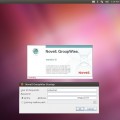
Update: Add Ubuntu 12.04 supportAktualisierung: Ubuntu 12.04 Unterstützung hinzugefügt. Installing Novell Groupwise 8 on Ubuntu 11.10 Oneiric Ocelot or 12.04 Precise Pangolin 64-Bit.Installation von Novell Groupwise 8 unter Ubuntu 11.10 Oneiric Ocelot oder 12.04 Precise Pangolin 64-Bit. DownloadsDateien herrunterladen Download the Groupwise 8 Linux Client Tarball from Novell:Groupwise 8 Linux Client Tarball von Novell herrunterladen: […]
Racktables custom report
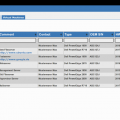
Two custom reports for Racktables to list physical servers and virtual machines.Zwei Custom Reports für Racktables um physikalische und virtuelle Server aufzulisten. Just download it here:Download hier: [download#15#size#nohits] New version available !! Klick here.Neue Version verfügbar !! Bitte hier klicken. Move folder „extensions“ into the racktables „wwwroot“ folder and create or modify „local.php“ in the […]
Install Ubuntu on DELL Latitude ST Tablet

NOTE: It’s all testing and not stable! Try at your own risk! Attention:Achtung The GMA600 graphic hardware acceleration is not working ! 1. InstallInstallation You need USB-Hub, USB-Keyboard and an USB-Stick. 1.1 Download UbuntuUbuntu herrunterladen First download the latest Ubuntu release (currently Ubuntu 12.04 Alpha 2) Download Daily BuildDaily Build herrunterladen Choose ‚precise-desktop-i386.iso‘ and download […]
Install Foswiki on Ubuntu with Nginx
The serverDer Server I start with a default installation of Ubuntu server (11.10 in this Howto). Install Nginx Install software to add PPA: aptitude install python-software-properties Add Nginx PPA: nginx=stable # use nginx=development for latest development version add-apt-repository ppa:nginx/$nginx Install Ngnix: aptitude update aptitude install nginx See Nginx install Ubuntu PPA for more details. FastCGI […]
Xen FileSystem Performance Test

Testing XenServer filesystem performance on plain hardware and the difference between EXT and LVM. How To Change the Default Storage Repository to EXT3 HardwareHardware IBM Blade HS21 2x Intel(R) Xeon(R) CPU E5540 @ 2.53GHz 16 GB RAM LSI SAS 1064 with 2 SAS Disc with Raid 1 SoftwareSoftware XenServer 5.6 SP2 Virtual Machines Ubuntu VMs […]
New year new theme

Happy new year ! A new theme is online. It’s a modified version of black-with-orange. Now with a little bit more colors and more cats. I hope everything works for you. If not please let me know !
Color Bash Prompt on Ubuntu and Debian
Ubuntu Green Prompt for your user Edit “~/.bashrc“ and change: #force_color_prompt=yes to: force_color_prompt=yes To change it for all new users make the same in “/etc/skel/.bashrc“. Red Prompt for root Edit “/root/.bashrc“ and change “force_color_prompt=yes“ like for your user. Now change the color to red. Search this line: PS1=’${debian_chroot:+($debian_chroot)}\[\033[01;32m\]\u@\h\[\033[00m\]:\[\033[01;34m\]\w\[\033[00m\]\$ ‚ and change it to: PS1=’${debian_chroot:+($debian_chroot)}\[\033[01;31m\]\u@\h\[\033[00m\]:\[\033[01;34m\]\w\[\033[00m\]\$ ‚ […]
Create a Linux or Utility Live Stick
Create Linux Live USB Stick with UNetbootin. Easy way to test a lot of other linux distributions or play around with some system utilities. You can install the following OS and System utilities with unetbootin. Operating Systems * Ubuntu * Fedora * Debian * PCLinux OS * Linux Mint * Sabayon Linux * openSUSE * […]
Encrypt your USB Stick
Encrypt your USB Stick with cryptsetup or TrueCrypt on Ubuntu. 1. Use cryptsetup 1.1 Install cryptsetup: aptitude install cryptsetup 1.2 Setup cryptsetup volume: Unmount the stick and format it: umount /dev/usb1 cryptsetup luksFormat /dev/usb1 Type „YES“ an choose a password. Open the crypt partition: cryptsetup luksOpen /dev/usb1 crypt_USB Create new Filesystem and mount it: mkfs.ext4 […]